
🧩 Why privileged App Registrations deserve the same Zero Trust treatment as admins
Conditional Access is one of the strongest security controls in Microsoft Entra. We use it to protect users, enforce MFA, restrict locations, and reduce risk.
But for a long time, one category of identities was largely outside that model:
Workload identities.
App Registrations with application permissions often operate with more power than any human admin account in specific scopes — and until recently, they did so with very few guardrails.
That makes them one of the most underestimated attack paths in modern Entra tenants.
🤖 The uncomfortable truth about Application Permissions
Application permissions are fundamentally different from delegated access.
An App Registration with application permissions:
- Runs without any user context
- Is not protected by MFA
- Is usually excluded from sign‑in risk evaluation
- Often holds tenant‑wide permissions
- Authenticates using long‑lived secrets or certificates
Once granted, the app acts autonomously. No user. No session. No second factor.
That alone should already raise eyebrows.
🚨 Why this is worse than most admin accounts
Many organizations carefully protect Global Administrators:
- MFA enforced
- Conditional Access policies applied
- Privileged Identity Management used
But App Registrations often bypass all of that.
And the permissions they hold are not trivial.
Consider permissions like:
Sites.FullControl.AllFiles.ReadWrite.AllMail.ReadWriteDirectory.ReadWrite.All
These permissions allow modification, deletion, and exfiltration of data across the tenant.
If an app has write permissions, the risk is no longer theoretical.
A leaked secret does not just allow data access — it allows data manipulation, persistence, and destruction.
That is significantly more dangerous than a read‑only scenario.
Note: A Global Administrator technically holds full control over the entire tenant. The concern with App Registrations is not that they exceed GA privileges in absolute terms — it is that they are less visible, less monitored, and less protected, making them a more attractive and more overlooked attack target.
🔓 The real risk: leaked secrets and certificates
Client secrets and certificates:
- Are often stored in pipelines or scripts
- Rarely rotate
- Sometimes end up in logs, repos, or backups
If one of those credentials leaks, the consequences are simple:
- The app can authenticate from anywhere
- No user sign‑in is required
- No Conditional Access policy stops it
- No MFA challenge is triggered
At that point, the only thing protecting your tenant is hope.
🤔 What about Managed Identities?
Before diving into policy configuration, it is worth addressing Managed Identities — another common workload identity type in Azure.
Managed Identities (both system-assigned and user-assigned) are also workload identities, but they work differently:
- They authenticate directly against Azure Resource Manager, not against Entra ID in a way that triggers standard Conditional Access network evaluation
- They do not use secrets or certificates — Azure handles credential rotation automatically
- As a result, Named Location-based Conditional Access policies cannot be applied to Managed Identities in the same way
This makes Managed Identities inherently more secure for Azure workloads that support them.
The policies described in this article apply to App Registrations using client secrets or certificates. If your workload supports Managed Identities, prefer them over App Registrations wherever possible.
🌍 Why workload identities are perfect for location‑based controls
Unlike users, workload identities usually do not move.
They typically run from:
- On‑premises servers
- Azure workloads
- Automation platforms
- Known SaaS services with static outbound IPs
In other words: their network origin is predictable.
That makes them ideal candidates for Named Locations.
🛡️ Conditional Access for Workload Identities
Conditional Access for workload identities finally closes this gap.
It allows you to:
- Target specific App Registrations
- Apply Conditional Access without a user context
- Enforce network‑based restrictions
- Block access from unknown locations entirely
Important: Workload Identity Conditional Access policies apply to authentications within your own tenant only. Multi-tenant applications or external service principals that authenticate from a foreign tenant require a different approach and are not covered by these policies.
This is not about complexity. It is about basic containment.
✅ The most effective baseline: Named Locations
For privileged App Registrations, the single most effective control is also the simplest:
Only allow authentication from known IP ranges.
What this achieves:
- A leaked secret alone is no longer sufficient
- An attacker must also compromise your trusted network
- Internet‑wide abuse becomes impossible
- The attack surface shrinks dramatically
This is especially critical for apps with write permissions.
Read access leaks data. Write access changes reality.
🧪 Policy template: Locking down a privileged App Registration
This is a minimal, production‑ready baseline that works for most high‑risk workload identities.
🎯 Scope
- Target: One App Registration (workload identity)
- Use case: Tenant‑wide application permissions
(especially*ReadWrite*,*FullControl*, or directory write scopes)
👤 Assignments
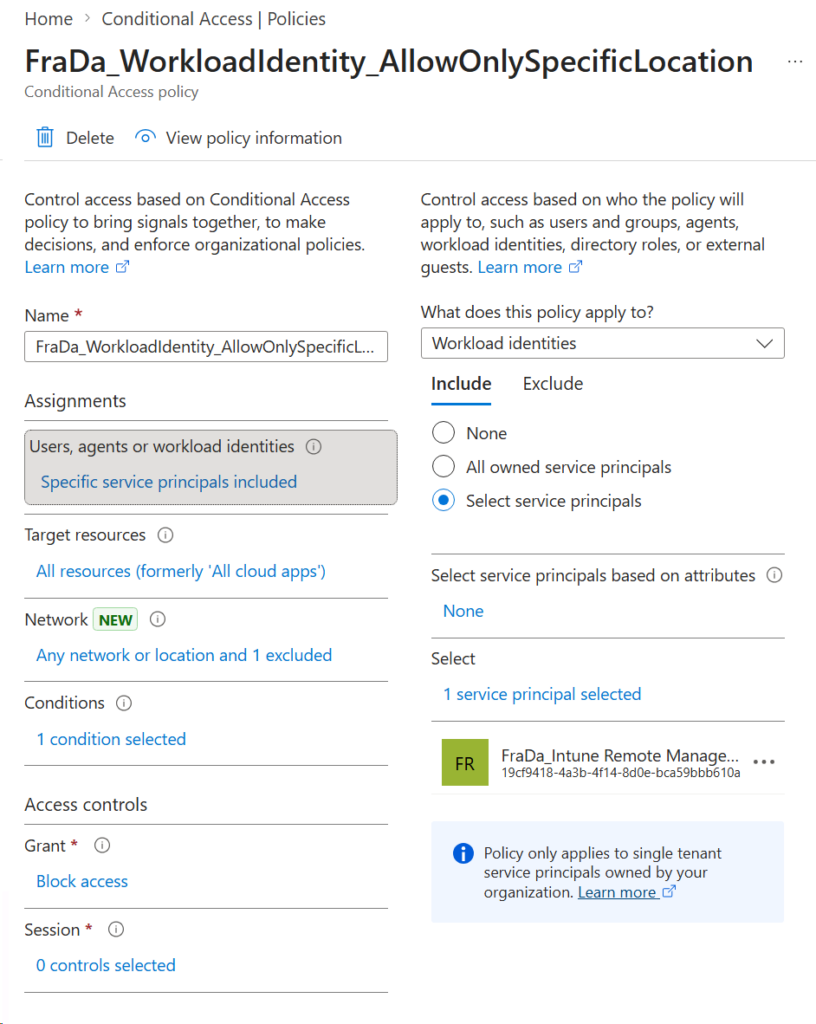
- Include:
- Selected workload identities
- Explicitly select the App Registration
- Exclude:
- None
Avoid broad targeting. Precision matters.
🌍 Conditions
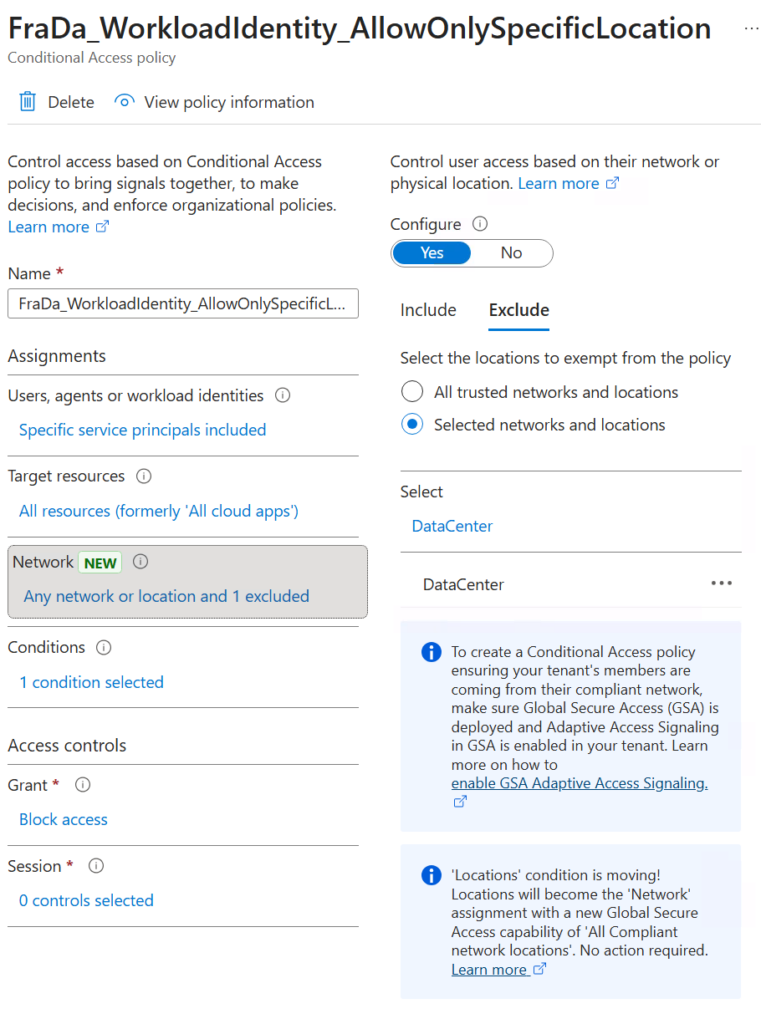
- Network:
- Include: Any location
- Exclude: Trusted Named Locations (fixed IP ranges)
This ensures the app can authenticate only from expected environments.
🚫 Access controls
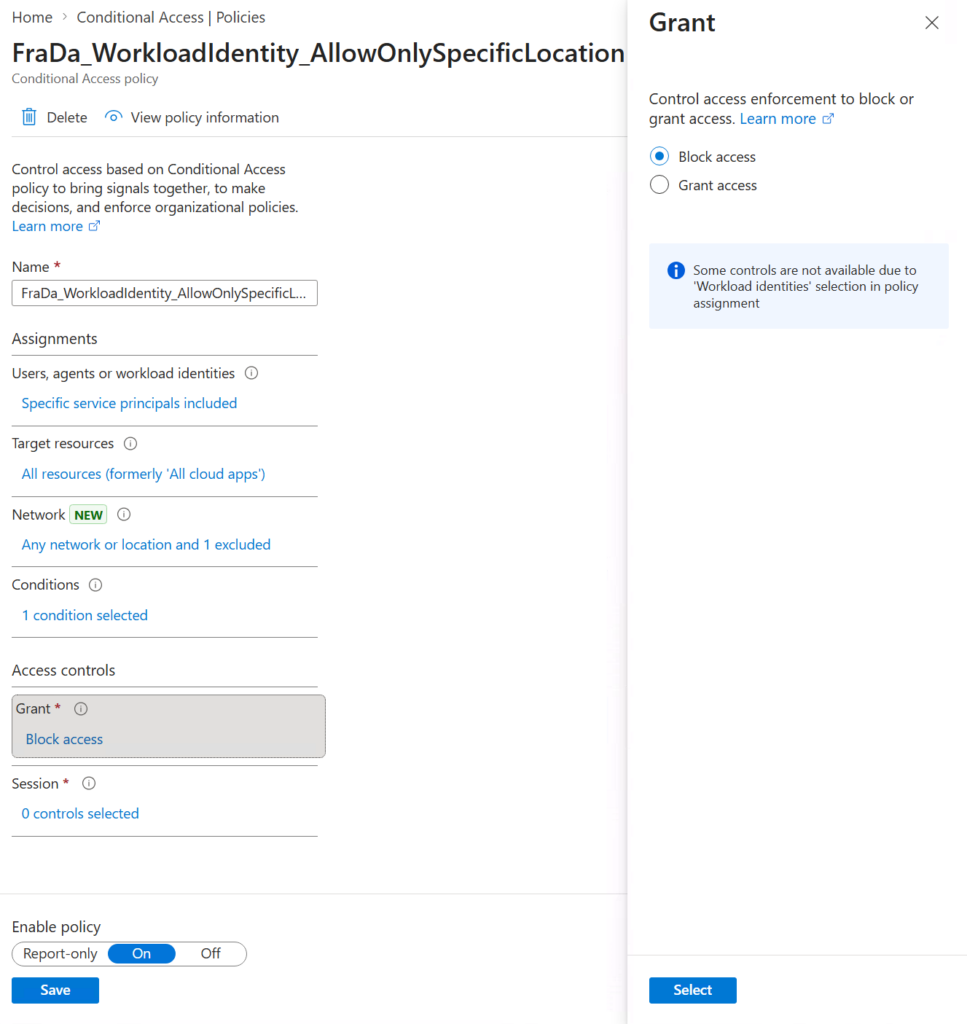
- Grant:
- Block access
Everything outside the trusted locations is denied — no exceptions.
📝 Operational notes
- One policy per privileged app simplifies troubleshooting and audit trails — this is the recommended starting point.
- For environments with many apps sharing the same source IP ranges, consider grouping them into a single policy targeting multiple workload identities with the same trusted location, to keep policy count manageable.
- Document the owning system and IP source for each policy.
- Use Report‑only mode for initial validation.
- Revisit policies when hosting platforms or IP ranges change.
💰 Licensing reality check
Conditional Access for workload identities is:
- Licensed per App Registration
- Not per user
- 3 USD per app per month (list price)
For apps with tenant‑wide write access, this cost is negligible
compared to the potential impact of abuse.
🧠 Final thoughts
Workload identities are not secondary identities. They are first‑class attack targets.
An App Registration with application permissions can easily be:
- Highly privileged within specific scopes
- Less visible than admin accounts
- Far less protected
Conditional Access with Named Locations is one of the simplest and most effective hardening measures you can apply today — especially for apps with write permissions.
If you are serious about Zero Trust, this is where it must extend next.
Leave a Reply