

The SMS and voice retirement in Entra ID has been covered plenty by now. The timeline is public, the official retirement page has a clean table of dates, and there are good migration playbooks out there if you need the complete picture.
This post is about one specific thing I have not seen spelled out anywhere, and it changes who should be worried.
Almost everything written about September 1 assumes Microsoft will reach into your tenant and change your authentication methods policy. That is true for a lot of tenants. But if you have configured passkeys the way a security team would configure them, with attestation enforced and an AAGUID allow list, then the migration machinery will pass your users by. No nudge, no campaign switch, nothing you would notice.
That sounds like good news. It is the opposite.
🗓️ The two dates
September 1, 2026. Users who are enabled for SMS or voice in the Authentication Methods Policy, or in legacy per user MFA settings, get auto enabled for passkeys. The registration campaign moves to Microsoft managed state targeting passkeys, and those users get nudged to register a passkey at their next MFA sign in. The nudge is skippable, with unlimited snoozes by default.
February 1, 2027. Microsoft provided SMS and voice delivery is retired, for MFA and for self service password reset. Users whose only available method is SMS or voice get a blocking passkey registration prompt at sign in. Microsoft states plainly that there is no opt out from this milestone and that it applies to all tenants.
Two more dates in between: September 18 for the telecom provider catalog in the Microsoft Security Store, October 30 for actually configuring one if you have a regulatory need to keep telephony.
⚙️ What Microsoft managed actually does
This is worth being precise about, because the September change is wider than “your SMS users get a prompt”.
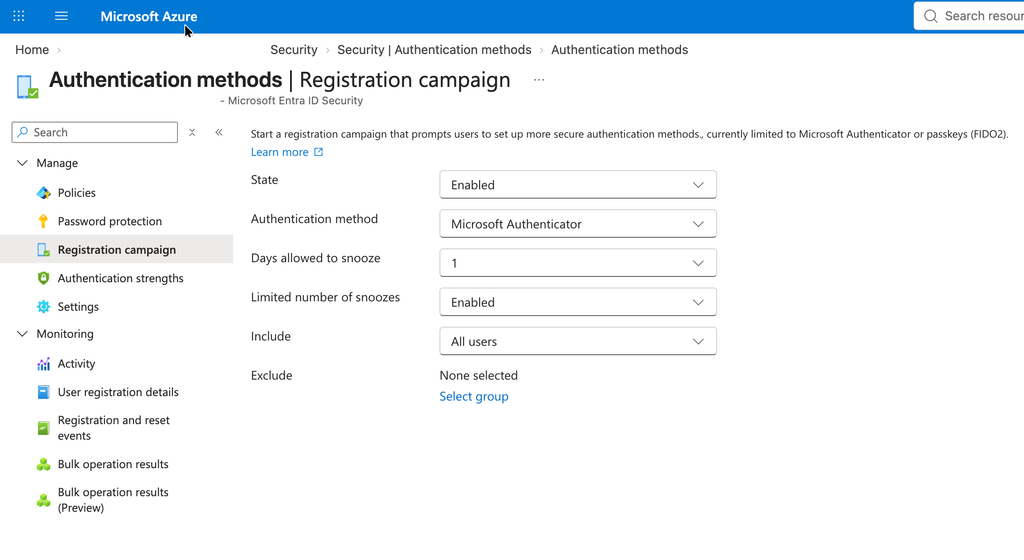
When the registration campaign flips to Microsoft managed, three things happen that you no longer control:
- The targeted method changes from Authenticator to passkeys.
- Days allowed to snooze becomes one day.
- Limited number of snoozes becomes disabled, meaning unlimited.
These are documented values, not settings you get to see. In Microsoft managed state the corresponding fields are not greyed out in the portal, they are simply gone from the blade. You are running configuration you cannot inspect in the UI, which is a good reason to note your current values before September 1 rather than after.
There is a fourth change, and it is where the two Microsoft documents stop agreeing with each other.
The registration campaign documentation, describing what Microsoft managed state does in general, states that user targeting changes from voice call and text message users to all MFA capable users. The retirement documentation is narrower. It only says that your campaign settings are set to Microsoft managed targeting passkeys and that this automatically brings the in scope users, meaning your SMS and voice users, into scope. It says nothing about the population widening.
Read together, the implication is uncomfortable. If your tenant is switched to Microsoft managed on September 1, the documented behaviour of that state applies, and that behaviour includes broader targeting. So the population being nudged may well not be your SMS holdouts. If you have 2000 users and 150 of them still use SMS, do not assume the prompt goes to 150 people.
I would not treat this as settled either way. Check your own campaign configuration before September 1 and again after, and see which of the two descriptions your tenant actually follows.
Affected users also get placed into a passkey profile that allows all passkey types. That includes synced passkeys, which live in platform credential managers such as iCloud Keychain and Google Password Manager, and therefore on personal Apple IDs and personal Google accounts.
If your credential design says device bound only, Microsoft is about to widen it for you.
🔒 The trap: restrictions make you invisible to the migration
Here is the part that flips the story.
The Microsoft managed campaign only reaches tenants that meet a specific set of conditions. From the registration campaign documentation: if your tenant targets specific AAGUIDs in the passkey (FIDO2) policy, the targeted authentication method does not update to passkeys under Microsoft managed mode.
And MC1279092 is even more explicit. Only users who are enabled for both synced and device bound passkeys, with no passkey profile restrictions configured, receive a passkey registration nudge during sign in. Attestation enforcement and AAGUID restrictions are both named as disqualifying restrictions.
Read that against your own tenant. If you did passkeys properly, meaning you enforced attestation so that a claimed AAGUID actually means something, and you restricted registration to the security key models and authenticator apps you approved, then:
- Your users are not eligible for the nudge.
- Your campaign does not switch to passkey targeting.
- Nothing visible happens on September 1.
- Your SMS and voice users stay exactly where they are.
- On February 1, those users hit the blocking prompt with no warning shots fired.
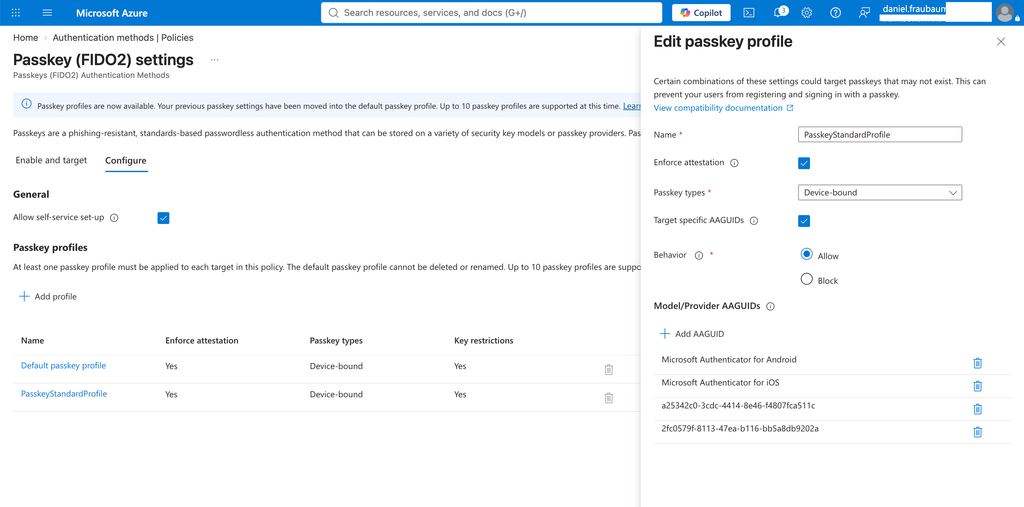
The tenants that took passkey security seriously are precisely the tenants that Microsoft’s migration mechanism will skip. The sloppy tenant gets six months of nudging. The careful tenant gets silence and then a wall.
One question I cannot answer from the documentation. The retirement notice says affected users are placed into a passkey profile that allows all types. Whether that provisioning can sit alongside a restricted profile, or override it, is not spelled out anywhere. If it can, a Tenant B on September 1 is not necessarily still a Tenant B on September 2.
There is only one way to find out what happened in your own tenant. Pull your Fido2 object now, pull it again on September 2, and compare the two. It takes two minutes. It also means the temporary opt out further down is not purely a Tenant A instrument: if you run restrictions and want certainty rather than a comparison after the fact, it buys you the same five months.
🪤 And you cannot simply have both
The obvious reaction is to drop the restrictions until the campaign has done its work. That does not survive contact with the details.
Attestation and synced passkeys are mutually exclusive. Synced passkeys cannot produce an attestation statement, so a profile with attestation enforced excludes them by definition. And without attestation, an AAGUID allow list is advisory rather than enforceable, because Entra cannot verify claimed attributes of the passkey, including whether it is synced or device bound. An attacker registering a credential can lie about its AAGUID.
So the choice is not between strict and relaxed. It is between:
- Attestation enforced: device bound only, AAGUID list is a real gate, no Microsoft nudge machinery.
- Attestation off: synced passkeys allowed, AAGUID list is a policy guide and not a control, Microsoft nudge machinery available.
There is no configuration that gives you an enforced allow list and the automatic migration at the same time. If you are running a hardened admin profile, you already made this choice. You just may not have realised it also opted you out of the migration path.
🧾 So which tenant are you
Tenant A, no passkey profile restrictions. September 1 will change your policy, possibly widen your nudge well beyond your SMS population, and enable synced passkeys into consumer credential managers. Your job is to take control before that happens: configure the passkey profile yourself, decide consciously whether synced passkeys are acceptable in your environment, and set the registration campaign state explicitly.
Explicitly is the operative word there, and it does not automatically mean Enabled. Microsoft managed is the default state, so the choice is between running a configuration you own and running one Microsoft is allowed to change. Which of the other two you pick depends on how you actually intend to migrate. Enabled makes sense if you want the nudge as a migration tool, but then tune it: limit the number of snoozes and target your phone based users rather than everyone. Enabled with unlimited snoozes is Disabled with extra prompts. Disabled makes sense if you are driving registration through Conditional Access authentication strength, because a dismissible nudge running alongside an enforcing policy just produces two uncoordinated prompts for the same user.
One caveat I cannot resolve from the documentation: whether an explicitly configured Disabled survives September 1, or whether the retirement rollout sets Microsoft managed regardless. The retirement documentation only says the settings are set to Microsoft managed. Set it, then check afterwards that it held.
For what it is worth, I go the authentication strength route every time. A nudge asks. A Conditional Access policy with an authentication strength decides. I know which users are affected because I choose the assignment, I know when it takes effect because I choose the date, and I can stage it across groups without waiting for a campaign to do something I cannot inspect. Handing the timing and the targeting of a credential migration to a Microsoft managed default is the opposite of that.
The honest limitation of my own preference: Conditional Access governs sign in, not password reset. Authentication strength does nothing for your SSPR posture, and SSPR is squarely inside this retirement. So even with a clean authentication strength rollout, the SSPR method policy stays on your list as a separate piece of work.
If you need more time before any of this, there is a documented temporary opt out, see below.
Tenant B, attestation or AAGUID restrictions in place. September 1 is a non event for you, and that is the risk. You get no free migration engine. You need your own path to February 1: identify the SMS and voice users, issue approved keys or Authenticator based device bound passkeys, drive registration through Conditional Access authentication strength rather than through nudges, and use Temporary Access Pass for the bootstrap. Put a date on it. Nothing will remind you.
Most organisations I work with are Tenant B for admins and Tenant A for everyone else, because the admin profile is restricted and the general staff profile is not. That means both problems apply, to different populations, and the September nudge will only ever reach one of them.
🛑 The temporary opt out, and what it is not
For Tenant A, there is a documented way to hold the September changes. It landed in the Learn documentation on August 10 and it is Graph only, there is no portal switch. You need Policy.ReadWrite.AuthenticationMethod.
PATCH https://graph.microsoft.com/beta/policies/authenticationmethodspolicy
Content-Type: application/json

{
  "optOutSettings": {
    "passkeyDynamicMigration": true
  }
}
With this set, the tenant is excluded from the automatic passkey enablement and the registration campaign rollout for the opt out period, which runs from September 1, 2026 to February 1, 2027.
Three things it does not do. It does not affect February 1 in any way. It does not remove your need to migrate users off SMS. And it does not survive being forgotten, which is the actual failure mode here. If you set it, put an owner and an expiry date on it the same day, and write down what you are going to do with the time you just bought. An opt out without a dated plan simply moves the crunch from September to January.
🔍 Check what your tenant looks like right now
Before you decide anything, read the policy back. Everyone publishes the PATCH, almost nobody publishes the GET. One request in Graph Explorer answers all of it, with Policy.Read.All:
GET https://graph.microsoft.com/beta/policies/authenticationmethodspolicy
That returns the whole policy in one response. The three requests further down are not additional steps, they are narrower views of the same object for when the full response gets unwieldy. Four things to look at:
Is the opt out set? Look for optOutSettings and the passkeyDynamicMigration value. If the property is missing entirely, the opt out is not set.
Are you Tenant A or Tenant B? In authenticationMethodConfigurations, find the entry with "id": "Fido2" and check whether attestation is enforced and whether key restrictions or specific AAGUIDs are configured. Any restriction here means the September nudge will pass your users by. The passkey profile properties are still moving in beta, so read the whole Fido2 object rather than looking for one specific field:
GET https://graph.microsoft.com/beta/policies/authenticationmethodspolicy/authenticationMethodConfigurations/Fido2
Is your campaign already Microsoft managed? Check registrationEnforcement.authenticationMethodsRegistrationCampaign and its state. If it says microsoftManaged, you are handing over snooze settings and targeting on September 1.
Who is still in scope for phone based methods? Two requests, and pay attention to includeTargets rather than just the state, because “enabled for all users” and “enabled for one legacy group” are very different problems:
GET https://graph.microsoft.com/beta/policies/authenticationmethodspolicy/authenticationMethodConfigurations/Sms
GET https://graph.microsoft.com/beta/policies/authenticationmethodspolicy/authenticationMethodConfigurations/Voice
Do not forget legacy per user MFA settings on top of this. Users enabled for SMS or voice there are in scope for September as well, and they do not show up anywhere in the policy above.
For the user side rather than the policy side, use Microsoft’s own analyzer instead of writing your own. It is at github.com/microsoft/entra-sms-voice-usage-analyzer and needs Global Reader, Security Reader, or Authentication Policy Administrator.
👥 The guest problem, now with a date on it
Guests are in scope for the retirement but were until recently not part of the passkey story at all, because resource tenant registration was unsupported for them. That changed with MC1459133 on August 22. Microsoft will enable passkeys for B2B users from early October 2026, internal guests first, with the rollout running into late February 2027. It is on by default.
Which brings the same mechanic back around, one month later and for a different population. Any B2B user already covered by your Passkey (FIDO2) policy becomes eligible automatically, so if that policy targets All users, your guests are included and nobody had to enable anything. Exclusion takes precedence over inclusion, so if your support process is not ready for guest passkeys, the exclusion has to be in place before October. The same profile scoping that decides whether the September nudge reaches your own users decides whether the October rollout reaches your guests. Look at that policy once and answer both questions.
One practical detail that will otherwise generate tickets: if you run a restricted cross tenant application allowlist, it needs to include My Sign-ins, application ID 19db86c3-b2b9-44cc-b339-36da233a3be2. Without it a guest who needs resource tenant MFA cannot reach the registration page at all.
None of this removes the older option. If you have guests with phone based MFA and no appetite for managing their credentials, the cleanest exit is still to stop being their MFA provider. Cross tenant access settings let you trust MFA claims from the guest’s home tenant, which moves the problem to the organisation that owns the identity. That only works for guests from another Entra tenant though, so anything on personal accounts or one time passcode stays yours. Worth reviewing now rather than in January, especially if your guest population grew after the SharePoint external sharing change pushed everything through B2B.
✅ Before September 1
- Run the read back requests above and decide whether you are Tenant A or Tenant B. Do it per profile, not per tenant, because you are probably both.
- Note your current registration campaign configuration and your Fido2 object now, then pull both again on September 2 and compare. That tells you how far the targeting actually widened and whether your passkey restrictions survived.
- Run the analyzer and get the list of users whose only method is phone based. That list is your February backlog.
- Check break glass accounts first. If any of them use voice call as a factor, fix that this week, not in the project.
- Tenant A: configure the passkey profile yourself, then set the campaign state explicitly. Enabled with limited snoozes and narrow targeting if you want the nudge, Disabled if Conditional Access is doing the enforcing. Or set the opt out with an owner and an expiry date.
- Tenant B: build your own registration path, Conditional Access authentication strength plus Temporary Access Pass, and schedule it. Nothing is going to prompt you.
- Review SSPR method policy. The retirement covers password reset too, and passkeys are not currently an SSPR verification method.
- Inventory guests with phone based MFA and check whether cross tenant MFA trust removes them from the problem entirely.
- Check whether your Passkey (FIDO2) policy targets All users. If it does, your guests become eligible for passkeys from October by default. Decide before then whether you want that, and exclude them if not.
None of this needs to be finished by September 1. But the decision of which tenant you are needs to be made before then, because after September 1 one of the two groups will have had its policy rewritten for it.
Leave a Reply