

If your users share SharePoint or OneDrive files with external partners, October 2026 is a date you want on your radar. Microsoft is retiring SharePoint One-Time Passcode authentication (SPO OTP) and moving all external sharing to Entra B2B. For some tenants this change already breaks external sharing today, quietly, and without an obvious error pointing to the real cause. In this post I will walk through what exactly is changing, the two traps hiding in this migration, and how I solved the resulting guest governance gap with a small open source project called VouchGate.
🔄 What is changing
Until now, SharePoint Online had two models for external sharing. Without the Entra B2B integration enabled, sharing files and folders used SharePoint’s own external authentication: the recipient received a one-time passcode by mail, no guest account was ever created in Entra ID, and your Entra External Collaboration Settings simply did not apply. Sharing happened entirely outside the directory.
That model is going away in two phases (announced in message center post MC1243549):
Phase 1, rolled out since May 2026: Microsoft enables the SharePoint and OneDrive integration with Entra B2B in all tenants, regardless of the EnableAzureB2BIntegration setting. The option to disable the integration has been removed. Every new “specific people” link now automatically creates a guest account through the Entra B2B invitation manager, and authentication runs through Entra B2B.
Phase 2, October 1 to October 31, 2026: the actual SPO OTP retirement. External users keep access to previously shared content only if they have a B2B guest account in your directory. Without one, they get access denied and the content has to be reshared.
One important clarification, because the naming causes confusion: the one-time passcode as an authentication method is not going away. Entra B2B itself uses email OTP as the default method for guests without their own Entra or Microsoft account. The experience for the external user feels similar. What changes is everything behind it: there is now always a guest object in your directory, and with it, all your directory controls apply.
⚠️ Trap one: your guest invite settings from five years ago
Because sharing now runs through B2B, the Entra External Collaboration Settings suddenly matter, in particular the guest invite settings (“who can invite guests”). Many organizations locked this down years ago, often to “only admins and users with the Guest Inviter role”, and then forgot about it, because SharePoint sharing happily bypassed it.
Not anymore. In those tenants, regular users can no longer share externally, even though the SharePoint sharing settings would allow it. The user sees a failed share in SharePoint, but the root cause sits in Entra. If your helpdesk is currently seeing mysterious external sharing failures, check the External Collaboration Settings first.
💥 Trap two: old shares break silently in October
Every share that went through the old OTP path belongs to a recipient without a guest account. Those recipients lose access during phase 2, and there is no warning to the internal user who shared the content. The external partner simply hits access denied, and best case, they complain. Worst case, a business process quietly stops working.
✅ Your preparation checklist
Before October, every tenant should get a review:
- External Collaboration Settings: who can invite guests, and do the domain allow and block lists still reflect what you want?
- Email OTP for guests must remain enabled as an authentication method, otherwise guests without their own account cannot get in at all.
- Conditional Access for guests: your CA policies now apply to file sharing recipients too. An MFA requirement for guests that never bothered anyone before now hits every shared link. That might be exactly what you want, but decide it consciously.
- Inventory existing sharing links to know what breaks in October. SharePoint sharing reports per site and Graph based reporting on sharing links are your friends.
- Prepare guest lifecycle management: every external share now creates a guest account. Without a process for expiry and cleanup, your directory fills up with stale guests, and your next audit will not be fun.
🚪 The governance gap, and why I built VouchGate
Here is the situation many organizations now find themselves in: they WANT controlled guest onboarding (that is why the invite settings were restricted in the first place), but with B2B mandatory, that restriction now blocks legitimate day-to-day sharing.
The native answer is Entra ID Governance Entitlement Management: access packages with approval workflows, expiry, and access reviews. It is a great product, and if you have the licenses, use it. But the licensing is exactly the problem. In the SMB space, Governance licenses for every internal user who requests access are rarely justifiable.
So I built the missing middle ground: VouchGate, a self-service guest access request portal with manager approval. Completely license free, it only costs you a few euros of Azure consumption per month.
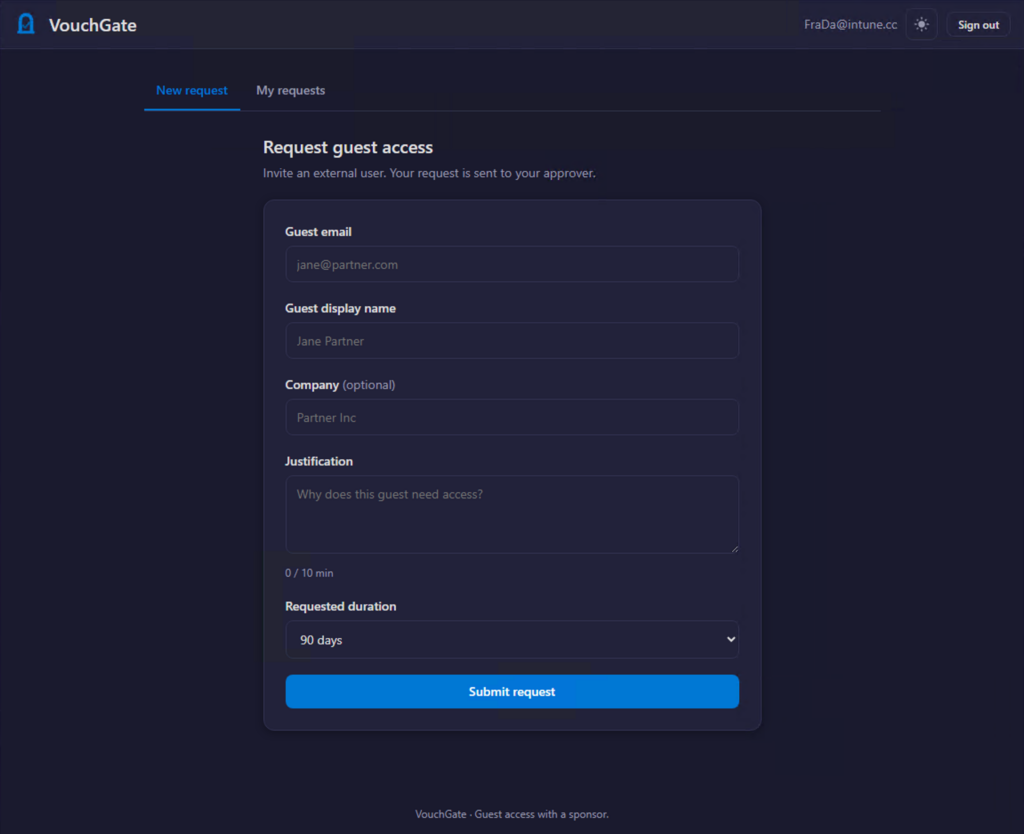
The flow is simple:
- An internal user signs in to the portal and requests a guest: email, display name, justification, and a requested duration (30 to 365 days).
- The approver is resolved server-side: the requester’s manager from the directory, with a configurable fallback approver group for users without a manager. If a request sits pending too long, it automatically escalates to the fallback group.
- The approver decides inside the portal (authenticated, no magic approve links in mails, they are a phishing and mail-scanner disaster waiting to happen). The notification mail deep links into the portal.
- On approval, an Azure Function creates the guest via the Graph invitation API and stamps three things on the guest object: the approval expiry date in extensionAttribute13, employeeType “VouchGate” as a marker, and the requester as the guest’s sponsor.
- The requester gets notified and shares from SharePoint as usual. The guest account already exists, so the restricted invite settings never get in the way.
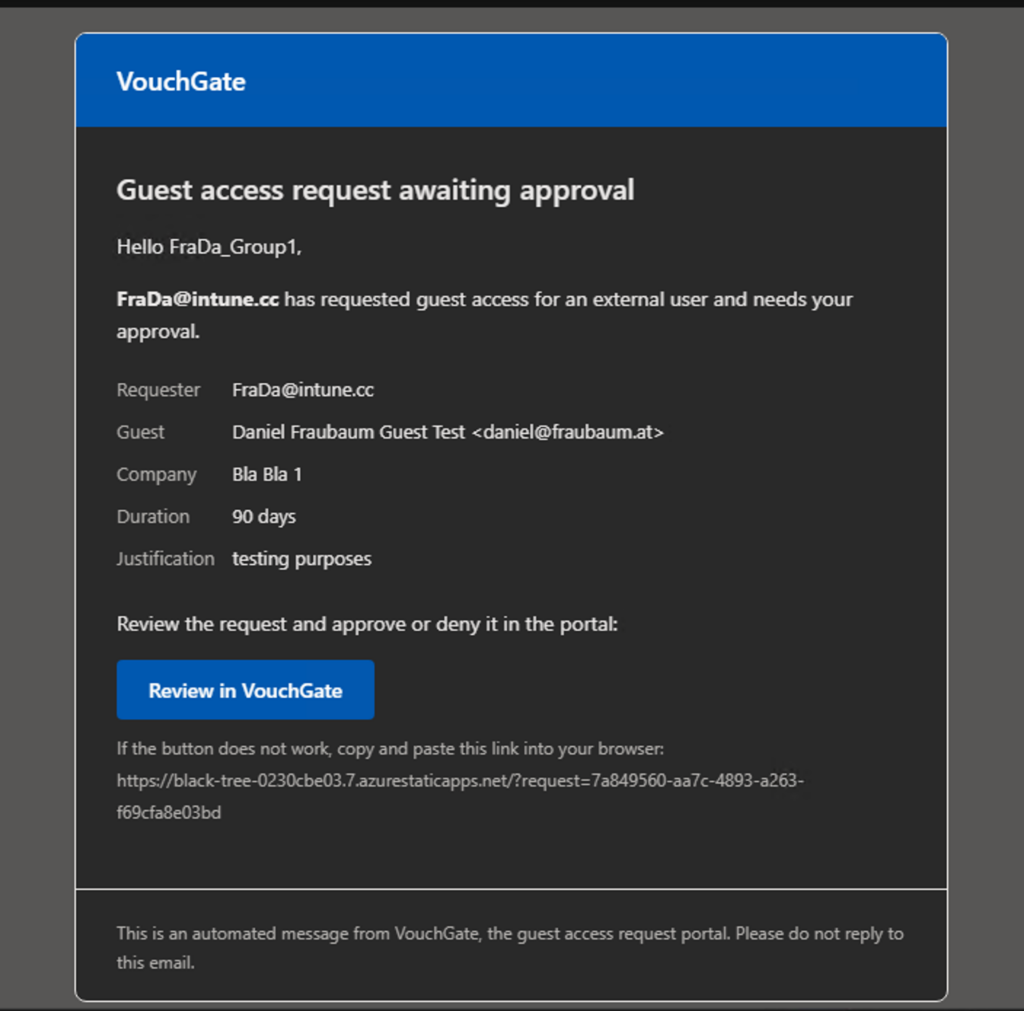
Some design decisions worth mentioning:
- Internal accounts are rejected as guest targets. The lookup matches guest accounts only, so nobody can accidentally (or deliberately) stamp lifecycle attributes onto a member account.
- Mail.Send is scoped. The portal sends notifications via Graph as a shared mailbox, and the deployment guide makes an Exchange Application Access Policy a mandatory step, so the managed identity can only ever send as that one mailbox instead of the whole tenant.
- Everything is audited. Every request, approval, denial and escalation lands in a storage table with requester, approver, approver type and timestamps. Combined with the Entra audit log you can answer “why does this guest exist and who vouched for them” at any time.
- Zero secrets. Managed identity for all Graph calls, no client secrets, no certificates to rotate.
♻️ Controlled entry needs controlled exit
VouchGate deliberately only handles the entry side. The exit side is handled by my existing EntraID Guest User LifeCycle Management project: it reads the expiry date VouchGate stamps into extensionAttribute13, disables expired guests, and removes them after a grace period. It also catches inactive guests based on sign-in activity, independent of any expiry date.
Together, the two projects form what I like to call Entitlement Management light: request, approval, provisioning with expiry and sponsor, and automated cleanup. No Governance licenses, just a Static Web App, a Function App, and two Logic Apps.
🚀 Getting started
VouchGate is open source (MIT) and deploys into your tenant in under half an hour: one Bicep based deployment script creates the app registration, the infrastructure, assigns the Graph permissions to the managed identity, and publishes frontend and backend.
https://github.com/daniel-fraubaum/VouchGate
The README covers the full setup including the Exchange mail scoping and the recommended access restrictions (assignment required plus Conditional Access). If you try it, I would love to hear your feedback, issues and pull requests are welcome.
And if you take one thing away from this post: check your External Collaboration Settings this week, not in October.
Leave a Reply