

TrayLight — A System Tray IT Support Hub for Windows, Built for Intune

TrayLight — A System Tray IT Support Hub for Windows, Built for Intune

If you manage Windows endpoints at scale, you’ve probably heard this request more than once:
“Can we give users a simple way to see their device info and reach IT support – without them having to dig through Settings?”

On macOS, tools like this have existed for years – a clean menu bar widget that shows device name, OS version, storage, and a few helpdesk shortcuts. Branded per customer. Managed via MDM profiles. Loved by IT teams.

On Windows? Nothing comparable existed.

So I built one.


Introducing TrayLight

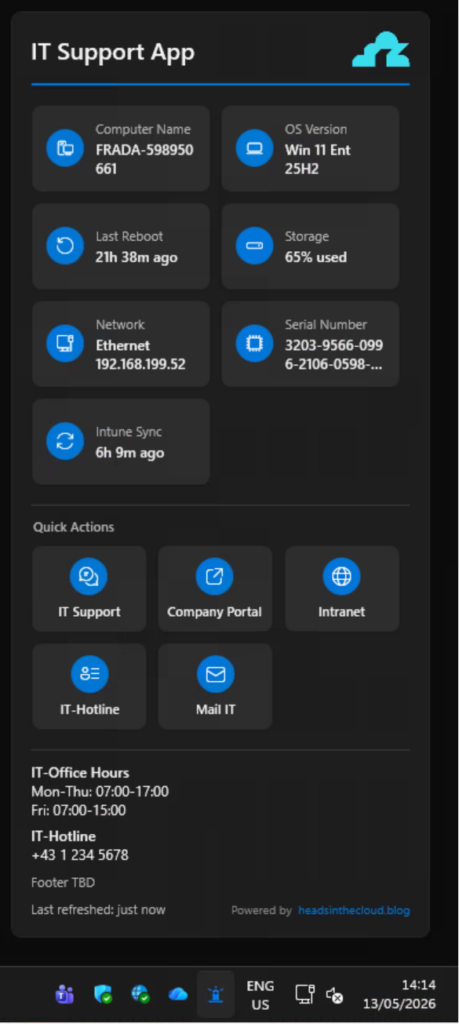
TrayLight is a lightweight Windows System Tray application that gives end users instant access to device information, IT support shortcuts, and Intune sync status – all from a single click on the tray icon.

It’s designed for enterprise environments. Fully configurable via ADMX templates. Deployable via Intune or Group Policy. Branded for your organization. And it works out of the box with zero configuration.

👉 GitHub Repository: https://github.com/daniel-fraubaum/TrayLight

✨ What It Does

TrayLight lives in the notification area next to the clock. Click the icon, and a modern popup appears – Windows 11 Fluent Design, light and dark theme following the system setting.

📊 Six Default Info Tiles

Out of the box, TrayLight shows six tiles:

  • Computer Name – click to copy (perfect for helpdesk tickets)
  • OS Version – edition + feature update version at a glance
  • Last Reboot – relative uptime with configurable warning threshold
  • Storage – system drive usage in percent, warns when full
  • Serial Number – hardware serial via WMI (with VM detection)
  • Intune Sync – time since last MDM check-in, click to trigger a sync

Additional tiles like Network Info can be enabled via policy.

⚡ Quick Action Shortcuts

Up to six configurable buttons below the info tiles. Each one can open a URL, launch an application, or run a command. Think:

  • 🎧 IT Helpdesk → Opens your ticketing system
  • 🖥️ Remote Support → Launches TeamViewer or ScreenConnect
  • 🌐 Intranet → Opens the company portal
  • 📧 Mail IT → Opens a pre-filled email to IT support

📋 Info Text Block

A free-text area below the shortcuts – configurable via a single registry value. Perfect for office hours, on-call information, or emergency contacts. Supports basic formatting with *bold*, | for line breaks, and || for blank lines.

🔔 Smart Warnings

TrayLight only warns about things that matter:

  • Storage above a configurable threshold (default: 90%)
  • Uptime exceeding a configurable number of days (default: 7)

When a warning is active, the tray icon swaps to a warning variant. Everything else is purely informational – a fresh device produces zero warnings.


🏗️ Designed for Enterprise

ADMX-Based Configuration

No JSON files. No custom scripts. TrayLight reads everything from the Windows registry under HKLM\SOFTWARE\Policies\TrayLight\ – the same “true policies” hive that Group Policy and Intune Settings Catalog write to.

The project ships with full ADMX/ADML templates that you can import into Intune or drop into your Central Store. Every setting – from branding to individual tile icons – is configurable through the familiar Administrative Templates UI.

MSI Deployment

TrayLight ships as a self-contained MSI (no .NET runtime required on the target). Deploy it as a Line-of-Business app in Intune, or via Group Policy Software Installation for on-prem environments.

Silent install: msiexec /i TrayLight.msi /qn

The MSI registers a Run key so TrayLight starts automatically on every user logon. Admins can suppress this via the Behavior\AutoStart ADMX policy without uninstalling.

Customer Branding

Every deployment can be branded:

  • Logo – via URL (auto-cached) or a local file path
  • Accent color – any hex color
  • Title – custom header text
  • Company name – shown in the About dialog
  • Footer text – custom line above the “Powered by” footer
  • Custom icons – per-tile icon override via Segoe Fluent Icons codes

🔄 The Intune Sync Tile

This one deserves its own section because it solves a real pain point.

The Intune Sync tile shows the actual time since the last successful MDM check-in – not some approximation, but the real ServerLastSuccessTime from the OMA-DM session data in the registry. The same value that Windows Settings shows.

Click the tile, and it triggers intunemanagementextension://syncapp – the same URI that the Company Portal uses. Instant sync, no need to open Settings or Company Portal.

On non-enrolled devices, the tile simply shows “Not enrolled” and is non-clickable.


🧩 The Story Behind It

I’ve been working in the Microsoft endpoint management space for years. Consulting, deploying Intune, hardening identities, automating everything.

And time and again, I saw the same gap: end users had no simple, branded touchpoint for device info and IT support on Windows. The macOS community had solutions for this for years. We had… nothing.

So I started building TrayLight. The ADMX part was particularly interesting — getting a custom ADMX to import cleanly into Intune’s Settings Catalog has some undocumented quirks (no presentation attributes on policies for Intune, no explainText on categories, unique element IDs across the entire file). If you’re building your own ADMX-configurable app, the TrayLight templates might save you some headaches.


📦 Getting Started

For IT Admins

  1. Download the latest MSI from GitHub Releases
  2. Deploy the MSI via Intune (Line-of-Business app) or via Group Policy Software Installation for on-prem environments
  3. Import the ADMX/ADML templates into Intune Settings Catalog or copy them into your AD Central Store (PolicyDefinitions) for classic Group Policy
  4. Configure branding, tiles, and shortcuts via Settings Catalog or GPO
  5. Assign to your device groups

TrayLight works with both modern (Intune) and classic (AD/GPO) management – same MSI, same ADMX templates, same registry paths.

Full deployment guide: INTUNE-DEPLOYMENT.md

For Developers

git clone https://github.com/daniel-fraubaum/TrayLight.git
cd TrayLight
dotnet build TrayLight.sln
dotnet run --project src/TrayLight/TrayLight.csproj

Prerequisites: .NET 8 SDK, Windows 11 SDK (10.0.26100).


🎯 What’s Next

TrayLight v1.0.0 is out and stable. I’m using it internally with customers already.

If you’re managing Windows endpoints and want to give your users a better experience – or if you just want a branded IT support widget that doesn’t require a five-figure license – give it a try.

Feedback, issues, and contributions are welcome on GitHub.

👉 github.com/daniel-fraubaum/TrayLight

24 responses to “TrayLight — A System Tray IT Support Hub for Windows, Built for Intune”

  1. Nathan Avatar
    Nathan

    Hi Daniel, I just wanted to say great work on this. It has a nice modern feel, really easy to use and a nice feature with the Intune sync !! I’ve configured most settings via ADMX/Intune policy but the only setting that doesn’t appear to work is “Auto-start at logon” set to Enabled. It doesn’t auto start and requires me to manually open from Start Menu. This aside though it looks really good and thanks for sharing with the community !!

    1. Daniel Fraubaum Avatar

      Thanks so much for the kind feedback, really appreciate it!
      Regarding auto-start: the auto-start mechanism uses an HKLM Run key that is set by the MSI installer during installation — it’s not controlled by the ADMX “Auto-start at logon” policy (that policy only acts as a kill switch to suppress auto-start if needed).
      After the MSI installs, the Run key takes effect on the next user logon. So a logoff/logon or a reboot after deployment should do the trick. On Autopilot devices it works immediately because the MSI installs before the first user sign-in.
      Could you verify the Run key exists on your device?
      Get-ItemProperty “HKLM:\SOFTWARE\Microsoft\Windows\CurrentVersion\Run” | Select-Object TrayLight
      If it shows the path to TrayLight.exe, a logoff/logon should fix it. If it’s missing, the MSI installation might not have completed fully.

  2. Luke Avatar
    Luke

    Hi Daniel, I have just been tinkering around with it as of yesterday and it seems like a really useful tool and it has some positive feedback already and we haven’t rolled it out just yet as I’m currently just getting it to a configured place where we can be happy to roll it out, however I have come across one thing that is not necessarily important to our ability to push it out but it would be a nice to have kind of thing, the tray icon admx setting seems to not pick up the .ico file and I have attempted putting the icon on a public domain such as github, put it on a local drive, a shared drive and nothing seems to pull it down, is there some requirements for it, or am I utilising it incorrectly?

    1. Daniel Fraubaum Avatar

      Hi Luke, thanks for the feedback and glad to hear it’s being well received already!
      You’re right — the custom tray icon via the ADMX Branding\TrayIcon policy is not fully working yet in v1.0.0. The setting exists in the ADMX template but the app currently only uses the built-in embedded icons for the tray. This is a known limitation I’ll address in a future update.
      For now, the logo setting (Branding\Logo) works for the popup header image — that one supports both URLs and local file paths. But the actual system tray icon requires a code change to load a custom .ico file at runtime.
      I’ll prioritise getting this fixed. In the meantime, if you need a custom tray icon, you could replace app-normal.ico and app-warning.ico in C:\Program Files\TrayLight\ with your own .ico files (same filenames) and restart TrayLight — that’s a manual workaround until the ADMX-based approach works.
      Thanks for reporting this!

      1. Luke Avatar
        Luke

        Thanks for the quick reply, and I appreciate the workaround provided, I’ll give it a go! Do you have a feed so to speak that will allow us to know when new versions come out? We utilise Robopack for applications in Intune as well, I was just wondering if that’s an avenue you may be interested in going down as well.

        1. Daniel Fraubaum Avatar

          Hi Luke,
          good question!
          The easiest way to stay updated is to “Watch” the GitHub repo (click the Watch button at the top of the repo page, then select “Releases only”). GitHub will send you a notification whenever a new version drops.
          And if you ever run into issues or have feature ideas, the best place to report them is via GitHub Issues on the repo. That way I can track everything in one place and you can follow the progress on your request directly.
          Regarding Robopack, that’s an interesting idea and definitely something I’ll look into as the project grows. For now the MSI is available directly from GitHub Releases which works well for both manual and Intune-based deployments.
          Thanks for the suggestion!

  3. Jerome Favier Avatar
    Jerome Favier

    Hello Daniel,
    Very interesting tool !
    Just some comments :
    – You are using .NET8 and it will EOL in November. Are you planning to migrate it to .NET10 ?
    – Are you planning to add multilanguage support ? For example, IT hotline number different in UK, FR and ES?

    I have other ideas, don’t hesitate to contact me by email 🙂
    Many thank for creating this tool ^^

    1. Daniel Fraubaum Avatar

      06:05Claude hat geantwortet: —
      Hi Jerome, thanks for the great feedback and the ideas!
      Good news on both points: the next version (planned for release by the end of this month) includes the migration to .NET 10 LTS as well as multi-language support. The UI will auto-detect the Windows display language, with English, German, and French built in. Additional languages can be added via ADMX or contributed via PR.
      On the different hotline numbers per country: that’s already possible today. You can create separate Intune configuration profiles with different shortcut and footer settings, then assign each one to the matching regional group (UK, FR, ES). Same app, different config per group.
      Would love to hear your other ideas. Feel free to drop them here or open a GitHub issue so I can track them properly. Thanks again for the kind words!

  4. Giuseppe Avatar
    Giuseppe

    Dear Daniel,

    Thank you for this amazing and fantastic tool.
    Is there any chance that the next version might include the option to add a tile showing the machine’s RAM usage?

    1. Daniel Fraubaum Avatar

      Hi Giuseppe,

      Thanks for the kind words!

      Interesting idea, quick question though: what would be your use case for RAM usage? The thing is, unlike storage which is fairly static, RAM fluctuates constantly. Whatever TrayLight would show is always just a snapshot from a few minutes ago. By the time you look at it, the actual value might be completely different.

      And refreshing more frequently wouldn’t really help either, at that point TrayLight itself would start consuming noticeable resources just to display a value that keeps changing anyway. That’s Task Manager territory, not really what TrayLight is designed for.

      That said, I can see it being useful as a rough health indicator (e.g. “this machine only has 8 GB and it’s always maxed out”). So curious to hear what scenario you had in mind!

      Thanks,
      Daniel

  5. Damian Avatar
    Damian

    Hi Daniel,

    I am on the middle of testing TrayLight. It looks great, but I have one question. I set policy to not show welcome screen at app startup. Even if ShowWelcomeScreen = 0, TrayLight still shows welcome screen at every time when app starts. Is it a way different way to suppress this?

    Thanks,
    Damian

    1. Daniel Fraubaum Avatar

      Hi Damian, thanks for testing and glad you like it!
      You’re right, this is a confirmed bug. The app currently only checks the local user setting (“Don’t show again” checkbox) but doesn’t properly evaluate the ADMX policy value from HKLM. We’re already working on the fix and it will be included in the next release.
      As a workaround for now: clicking “Don’t show again” on the dialog suppresses it for that user profile going forward. Not ideal for enterprise rollout, but it works until the fix is out.

  6. Toni Avatar
    Toni

    Hi Daniel, thanks for this great tool and for sharing it with us.
    In the readme.md, you mention other tiles available via ADMX: “Entra ID Status” and “Intune Compliance.” Unfortunately, I can’t seem to find them; is there a newer ADMX version available that includes them?

    1. Daniel Fraubaum Avatar

      Hi, thanks for the kind words!
      Apologies for the confusion. The README is outdated on that point and I’m already in the process of updating it. Entra ID Status and Intune Compliance are not available as ADMX-configurable tiles in the current version. The only additional tile you can enable via ADMX is Network Info.
      What IS available out of the box is the Intune Sync tile (not Intune Compliance), which shows the time since the last MDM check-in and lets you trigger a sync with a click. That one is enabled by default.
      Regarding Intune Compliance: I definitely want to add this as a tile in a future version. The challenge is that the compliance state isn’t easily queryable locally on the device. Unlike the sync timestamp which is stored in the registry, the compliance status lives in the Intune service and there’s no reliable local API or registry key that reflects it in real-time. I’m exploring options (Graph API, WMI MDM bridge, local compliance evaluation cache) but haven’t found a clean solution yet that works without additional permissions or network calls.
      If you have any insights on how to read the compliance state locally, I’d love to hear them!
      I’ll get the README corrected shortly. Thanks for flagging it!

      1. Toni Avatar
        Toni

        ((Get-Content -Path (Get-ChildItem -Path (Join-Path $env:LOCALAPPDATA “Packages\Microsoft.CompanyPortal_8wekyb3d8bbwe\TempState\ApplicationCache”) -Include *.tmp* -File -Recurse | Sort-Object -Descending -Property LastWriteTime)[0] | ConvertFrom-Json).Data | ConvertFrom-Json).ComplianceState

        1. Daniel Fraubaum Avatar

          Good catch, I will try it in the next version! Thanks Toni!

  7. Teme M. Avatar
    Teme M.

    Hi Daniel, is it possible to configure Quick Actions via the registry HKLM\SOFTWARE\Policies\TrayLight\ o a computer without using the ADMX template ? Help me …

    1. Daniel Fraubaum Avatar

      Hi, yes absolutely! The ADMX is just a UI wrapper around registry keys. You can set them directly without the template.
      Check the ADMX file for the exact key structure: https://github.com/daniel-fraubaum/TrayLight/blob/main/config/admx/TrayLight.admx
      For example, Shortcut slot 1 lives under HKLM\SOFTWARE\Policies\TrayLight\Shortcuts\1 with values like Title (REG_SZ), ActionType (REG_SZ), Action (REG_SZ), Icon (REG_SZ), Position (REG_DWORD) etc. You can set these via PowerShell script, a reg file, or any other tool that writes to the registry.
      Quick question though: what’s your reason for not using the ADMX template? Is it a technical limitation in your environment or just preference? Asking because the ADMX approach via Intune Settings Catalog or Group Policy is the recommended way and gives you a nice UI for configuration. Happy to help if you’re having trouble with the ADMX import.

  8. Daniel Fraubaum Avatar

    Quick update for everyone following along: TrayLight v2.0.0 is now available! 🎉
    This release addresses a lot of the feedback from the comments here:

    .NET 10 LTS — migrated from .NET 8 (thanks Jerome for the heads-up on the EOL date)
    Multi-language support — the UI now auto-detects the Windows display language, with English, German, and French built in. Additional languages can be set via ADMX or contributed via PR.
    Dynamic placeholders in shortcuts — you can now use {{ComputerName}}, {{OsVersion}}, {{SerialNumber}}, {{IntuneSync}} etc. in shortcut actions. Perfect for pre-filling a helpdesk email with the device info already in the body.
    ShowWelcomeScreen bug fixed — the ADMX policy is now properly respected (thanks Damian and others for reporting)
    Custom tray icon via ADMX now works
    Event log source is now properly registered

    Grab the latest MSI from GitHub Releases: https://github.com/daniel-fraubaum/TrayLight/releases
    Thanks to everyone who tested, reported issues, and shared ideas. Keep the feedback coming, best via GitHub Issues so I can track everything in one place!

  9. Remy Kuster Avatar

    Hi Daniel, great tool, testing it now but how can I:

    Additional languages can be set via ADMX or contributed via PR. I would like to add Dutch.

    1. Daniel Fraubaum Avatar

      Hi, thanks and glad you’re testing it!
      There are three ways to get Dutch in:

      1. Via ADMX (no rebuild needed)

      Every visible string — tile titles, header, footer, shortcut labels — can be overridden via ADMX policy. So you can simply set all the titles to Dutch in your Intune Settings Catalog or Group Policy profile. This works today, no code changes required. The downside is that some app-generated status texts (like “just now”, “X minutes ago”, “Not enrolled”) aren’t ADMX-configurable, so those would stay in the detected language or English.

      2. Via Pull Request (full translation)

      If you want proper full Dutch support including all status strings, you can add a Strings.nl.resx file to the project (just a copy of the English one with translated values), build it yourself, and optionally submit a PR so it becomes part of the official release for everyone. It’s a straightforward copy-translate job, no real coding involved.

      3. Open a GitHub Issue

      If you’d rather not build it yourself, just open an issue requesting Dutch and I’ll try to include it in the next version. If you’re willing to provide the translations, that would speed things up a lot since my Dutch is non-existent. 😉
      Let me know which way you’d like to go!

      1. Remy Kuster Avatar

        So i created an issue and added the .resx for Dutch

  10. Remy Kuster Avatar

    Can I hide Powered by at the bottom?

  11. Remy Kuster Avatar

    I also added some feature requests and ussues

Leave a Reply

Your email address will not be published. Required fields are marked *