

Another certificate expiry, another date for the Windows roadmap. Microsoft announced that a set of certificates Windows Update uses to verify it is talking to the real Windows Update service will expire on May 17, 2027 and June 19, 2027. Devices that do not have the replacement certificates by then stop connecting to Windows Update. Not “get fewer updates”. Stop. Quality updates, feature updates, drivers, all of it.
The official message is reassuring: for most devices no action is required, because the new certificates are already shipping in the normal monthly updates. That is true. It is also exactly the sentence that makes people close the tab. The devices that will actually break here are the ones that already stopped patching months ago, and those are, by definition, the devices nobody is looking at.
So this post is about finding them before May.
🔐 Not the Secure Boot story again
Let me get this out of the way first, because I already see it getting mixed up in customer conversations. This is not the Secure Boot certificate rollover. If you read my earlier post on preparing Intune devices for the Secure Boot certificate rollover, that one was about the 2011 UEFI CAs in firmware, DB and KEK updates, and boot media. Different certificates, different mechanism, different failure mode.
| Secure Boot rollover (2026) | Windows Update rotation (2027) | |
|---|---|---|
| What expires | Microsoft 2011 UEFI CAs in firmware | Certificates Windows Update uses to authenticate the service |
| Where the fix lives | Firmware DB/KEK, boot manager | Regular monthly cumulative update |
| Dates | June and October 2026 | May 17 and June 19, 2027 |
| Failure mode | No new boot security updates, boot media issues | Device stops talking to Windows Update completely |
| Hardware involved | Yes, OEM firmware matters | No, pure OS servicing |
The good news: this one is much simpler. No firmware, no OEM dependencies, no BitLocker recovery surprises. It is plain servicing hygiene. The bad news: plain servicing hygiene is exactly where most environments have a long, quiet tail of devices nobody owns.
🗓️ Who needs what, and by when
Microsoft published a version table. I added the concrete KB and minimum build for each line, because “the July 2026 security update or later” is not something you can filter on in a device inventory. A build number is.
| Windows version | Minimum update | Minimum build | Deadline |
|---|---|---|---|
| Windows 11 25H2 and later | None | any | n/a |
| Windows 11 24H2, Windows Server 2025 | September 2025 (KB5065426) | 26100.6584 | June 19, 2027 |
| Windows 11 23H2 | July 2026 (KB5099414) | 22631.7376 | June 19, 2027 |
| Windows Server 2022 | July 2026 (KB5099540) | 20348.5386 | June 19, 2027 |
| Windows 10 22H2 (ESU) and LTSC 2021 | July 2026 (KB5099539) | 19045.7548 / 19044.7548 | June 19, 2027 |
| Windows 10 Enterprise LTSC 2019, Windows Server 2019 | July 2026 (KB5099538) | 17763.9020 | May 17, 2027 |
| Windows Server 2016 | July 2026 (KB5099535) | 14393.9339 | May 17, 2027 |
| Everything else | Upgrade | n/a | Loses Windows Update access |
Two things jump out when you read that table slowly.
24H2 has had the certificates for over a year. The September 2025 baseline means a 24H2 device that fails this check has not installed a single cumulative update in thirteen months. That is not a certificate problem. That is a broken device that happens to still show up green somewhere.
The LTSC and older server builds have the earlier deadline. May 17, not June 19. Of course it is the population that is hardest to touch: kiosk devices, shop floor PCs, medical and lab systems, and that one Server 2016 box running a line of business app nobody wants to migrate. Plan for May and treat June as a bonus.
⚠️ The traps hiding in “no action required”
Here is where it gets interesting, because the table looks harmless until you combine it with the lifecycle calendar.
🧯 Windows 10 without ESU is simply out. “Windows 10 versions in support” means 22H2 devices enrolled in Extended Security Updates, plus LTSC. A Windows 10 22H2 device without ESU never got the July 2026 update, so it never got the new certificates. And ESU year one for commercial customers ends tomorrow, October 13, 2026. If you decided not to renew for year two, every Windows 10 device you still have will be stuck on whatever it has today. If that build is below 19045.7548, it goes dark in June 2027.
⏳ Windows 11 23H2 runs out of support before the certificates do. 23H2 Enterprise and Education reach end of servicing on November 10, 2026. A 23H2 device that installed the July 2026 update or later has the new certificates. A 23H2 device that did not, and then falls out of support in November, is in the worst possible spot: no new updates coming, and the clock ticking on Windows Update access.
🪤 Your upgrade path runs through the thing that breaks. This is the one I want every Intune admin to think about for a minute. If you use Intune feature update policies, Windows Autopatch, or the Windows Update for Business deployment service to move devices from 23H2 or Windows 10 to a current release, that upgrade is delivered by Windows Update. A device that has already lost Windows Update access cannot receive the feature update that would fix it. You are then back to ISO, Update Catalog, a task sequence or a technician with a USB stick. Fix it while the cloud path still works.
🖥️ Server 2016 has a timing problem of its own. Extended support for Windows Server 2016 ends on January 12, 2027, four months before its certificate deadline. Patch it to the July 2026 update or later now, while it still receives updates, and keep the migration project on the list anyway.
🏢 What about WSUS and ConfigMgr?
Microsoft states clearly that devices receiving updates from WSUS are not affected. Fine. But in reality, very few environments I see are pure WSUS anymore.
- Co-managed devices with the Windows Update policies workload moved to Intune get their updates from Windows Update. They are in scope.
- Hybrid setups where WSUS handles quality updates but drivers or feature updates come from Windows Update are partly in scope. The WSUS part keeps working, the Windows Update part does not.
- Devices that fall back to Windows Update when the WSUS server is unreachable (laptops off VPN, for example) lose that fallback.
One question I cannot answer from the announcement: whether the WSUS server itself, when it synchronizes from Microsoft Update, depends on the same certificates. Microsoft does not say. My advice is boring but safe: patch your WSUS and ConfigMgr site servers to the July 2026 update or later like everything else, and do not make that the device you test the theory on.
🔍 Find the affected devices in Intune
You could filter the device list in the Intune admin center by OS version and export it. That works for a quick look. For anything bigger, I prefer a script that compares every device against the table above and tells me which ones need attention and by when.
The script below reads all Intune managed Windows devices via Microsoft Graph, splits osVersion into build and revision, and flags each device as Ready, Update required or Upgrade required. It only needs the Microsoft.Graph.Authentication module, because it calls the Graph REST endpoint directly with Invoke-MgGraphRequest instead of relying on the full Graph SDK, plus the DeviceManagementManagedDevices.Read.All permission. Paging is handled, so it also works in tenants with thousands of devices.
<#
    Script:      Get-WUCertRotationReadiness.ps1
    Author:      Daniel Fraubaum
    Version:     1.2
    Date:        2026-10-12
    Description: Lists Intune managed Windows devices and checks whether their
                 OS build already carries the new Windows Update certificates
                 required after May 17 / June 19, 2027.
                 Requires only the Microsoft.Graph.Authentication module.
#>

# ==========================================================
# Parameters
# ==========================================================
$ExportPath = "C:\Temp\WUCertRotationReadiness.csv"
$StaleDays  = 30

# Minimum UBR (revision) per OS build. MinUbr 0 = no action needed.
$Thresholds = @{
    "28000" = @{ MinUbr = 0;    Deadline = "n/a";           Label = "Windows 11 26H1" }
    "26300" = @{ MinUbr = 0;    Deadline = "n/a";           Label = "Windows 11 26H2" }
    "26200" = @{ MinUbr = 0;    Deadline = "n/a";           Label = "Windows 11 25H2" }
    "26100" = @{ MinUbr = 6584; Deadline = "June 19, 2027"; Label = "Windows 11 24H2 / Server 2025" }
    "22631" = @{ MinUbr = 7376; Deadline = "June 19, 2027"; Label = "Windows 11 23H2" }
    "20348" = @{ MinUbr = 5386; Deadline = "June 19, 2027"; Label = "Windows Server 2022" }
    "19045" = @{ MinUbr = 7548; Deadline = "June 19, 2027"; Label = "Windows 10 22H2 (ESU)" }
    "19044" = @{ MinUbr = 7548; Deadline = "June 19, 2027"; Label = "Windows 10 LTSC 2021" }
    "17763" = @{ MinUbr = 9020; Deadline = "May 17, 2027";  Label = "Windows 10 LTSC 2019 / Server 2019" }
    "14393" = @{ MinUbr = 9339; Deadline = "May 17, 2027";  Label = "Windows Server 2016" }
}

# ==========================================================
# Logic
# ==========================================================

# Step 1: Check prerequisites
if (-not (Get-Module -ListAvailable -Name "Microsoft.Graph.Authentication")) {
    Write-Error "Module Microsoft.Graph.Authentication not found. Run: Install-Module Microsoft.Graph.Authentication -Scope CurrentUser"
    return
}

# Step 2: Connect to Microsoft Graph
try {
    Connect-MgGraph -Scopes "DeviceManagementManagedDevices.Read.All" -NoWelcome -ErrorAction Stop
    $Context = Get-MgContext
    Write-Output "Connected to tenant $($Context.TenantId) as $($Context.Account)"
}
catch {
    Write-Error "Connection to Microsoft Graph failed: $_"
    return
}

# Step 3: Get all Intune managed Windows devices (with paging)
$Devices = [System.Collections.Generic.List[object]]::new()
$Uri = "https://graph.microsoft.com/v1.0/deviceManagement/managedDevices" +
       "?`$filter=operatingSystem%20eq%20'Windows'" +
       "&`$select=deviceName,osVersion,lastSyncDateTime,userPrincipalName"

try {
    do {
        $Response = Invoke-MgGraphRequest -Method GET -Uri $Uri -OutputType PSObject -ErrorAction Stop
        foreach ($Item in $Response.value) { $Devices.Add($Item) }
        $Uri = $Response.'@odata.nextLink'
    } while ($Uri)
}
catch {
    Write-Error "Reading managed devices failed: $_"
    return
}

if ($Devices.Count -eq 0) {
    Write-Error "No Windows devices returned. Check permissions and tenant."
    return
}

# Step 4: Evaluate each device against the threshold table
$StaleDate = (Get-Date).AddDays(-$StaleDays)

$Results = foreach ($Device in $Devices) {
    $OsVersion = $null
    $LastSync  = [datetime]$Device.lastSyncDateTime

    if (-not [version]::TryParse([string]$Device.osVersion, [ref]$OsVersion) -or $OsVersion.Revision -lt 0) {
        $Status   = "Unknown OS version"
        $Deadline = "Check manually"
        $Label    = "Unknown"
    }
    else {
        $Rule = $Thresholds[[string]$OsVersion.Build]

        if ($null -eq $Rule) {
            $Status   = "Upgrade required (unsupported build)"
            $Deadline = "Before May 17, 2027"
            $Label    = "Out of support"
        }
        elseif ($OsVersion.Revision -ge $Rule.MinUbr) {
            $Status   = "Ready"
            $Deadline = $Rule.Deadline
            $Label    = $Rule.Label
        }
        else {
            $Status   = "Update required"
            $Deadline = $Rule.Deadline
            $Label    = $Rule.Label
        }
    }

    [PSCustomObject]@{
        DeviceName    = $Device.deviceName
        User          = $Device.userPrincipalName
        OsVersion     = $Device.osVersion
        Release       = $Label
        Status        = $Status
        Deadline      = $Deadline
        LastSync      = $LastSync
        DaysSinceSync = [int]((Get-Date) - $LastSync).TotalDays
        Stale         = $LastSync -lt $StaleDate
    }
}

# Step 5: Export and summarize
try {
    $ExportFolder = Split-Path -Path $ExportPath -Parent
    if (-not (Test-Path -Path $ExportFolder)) {
        New-Item -Path $ExportFolder -ItemType Directory -Force | Out-Null
    }

    $Results | Sort-Object Status, DeviceName |
        Export-Csv -Path $ExportPath -NoTypeInformation -Encoding UTF8 -UseCulture -ErrorAction Stop

    Write-Output "Exported $($Results.Count) devices to $ExportPath"
    $Results | Group-Object Status, Stale | Sort-Object Name |
        Select-Object @{ Name = "Status, Stale"; Expression = { $_.Name } }, Count |
        Format-Table -AutoSize
}
catch {
    Write-Error "Export failed: $_"
}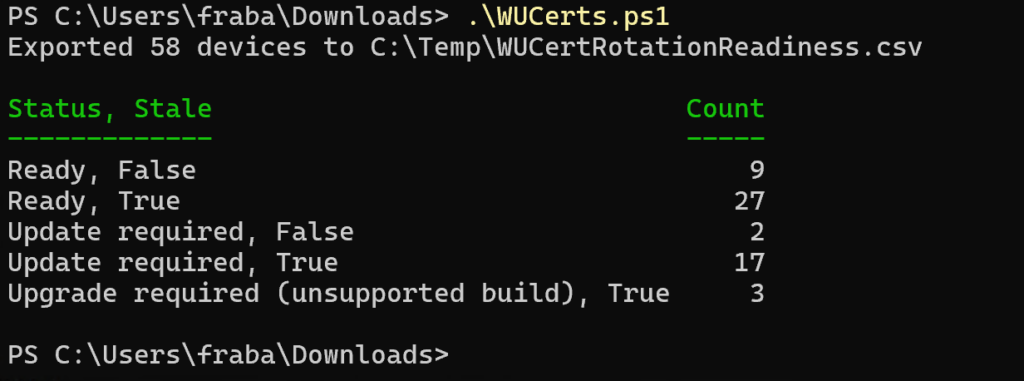
A few notes on reading the output:
- Look at the
Stalecolumn first. Intune only knows the build the device reported at its last check-in. The script marks every device that has not synced in 30 days (adjust$StaleDaysif you like). A stale device is not “Update required”, it is “unknown”, and probably sitting in a drawer. - Unknown builds are flagged as upgrade. Anything not in the table (Windows 11 22H2 and older, Windows 10 before 21H2, Insider builds) lands there on purpose. Check them manually, but most of them really are out of support. One catch: Windows 10 Enterprise 21H2 shares build 19044 with LTSC 2021, so those devices show up as LTSC 2021 even though they are long out of support.
- Servers are usually not in Intune. The thresholds for Server 2016 to 2025 are in the table so you can reuse the logic with Azure Arc, Defender for Endpoint inventory or whatever you use for servers.
✅ Your action plan before May 2027
- Run the inventory now, not in April. Clean up stale devices first, otherwise you chase ghosts.
- Find out why the “Update required” devices are stuck. Paused rings, broken Windows Update components, full disks, devices excluded from update policies “temporarily” in 2024. The certificate is only the symptom.
- Decide on Windows 10 ESU year two for every remaining Windows 10 device, or make sure it is upgraded or at least on 19045.7548 before it drops out.
- Move 23H2 to 25H2 before November 10, 2026, while feature update policies can still deliver it through Windows Update.
- Treat LTSC 2019 and Server 2016/2019 as a May deadline and talk to the owners of those systems this quarter. They usually have change windows measured in months.
- Repeat the check monthly until June. New stale devices appear all the time.
💭 Final Thoughts
I like how Microsoft handled this one. The certificates shipped long before the announcement, 24H2 has carried them since September 2025, and there is no firmware drama involved. For a well managed fleet this really is a non-event.
But that is also why I think it deserves attention. This rotation does not hit the devices you manage well. It hits the ones that silently fell out of your patching months ago, and it turns a quiet compliance gap into a hard stop with a date on it. In a way, it is a free audit of your update management. Use it.
Because the devices that will break in June 2027 are already broken today. You just have not looked.
Leave a Reply